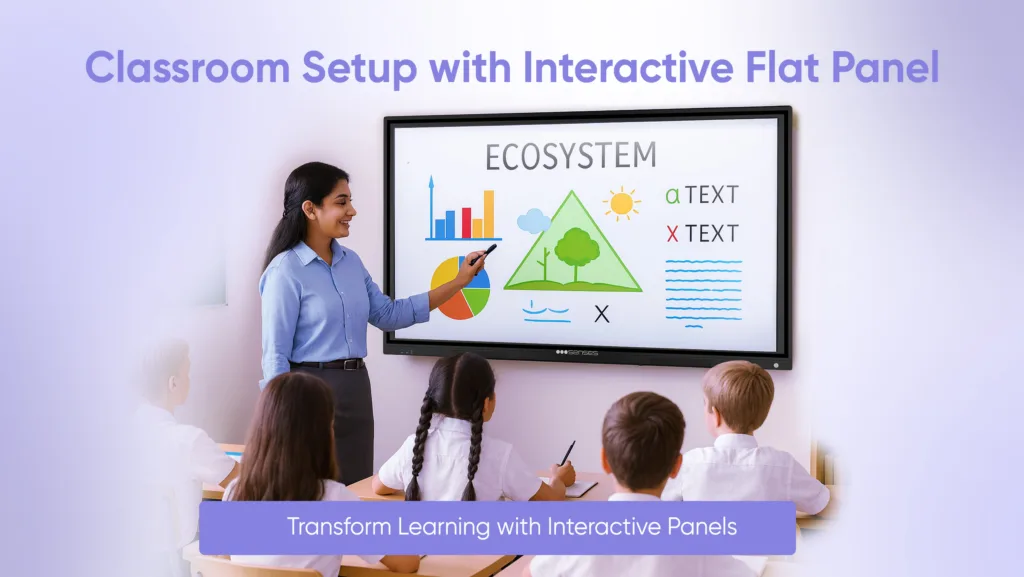
An interactive flat panel ( an IFP) is a modern touch screen display designed to replace traditional blackboards and projectors in classrooms. They allow the teacher to write/draw, present lessons, and to play videos on the screen, while students can also engage with classroom content in real time.
Using an interactive panel for classroom instruction is engaging for your students, allows for student collaboration, and supports both online and offline teaching. With interactive panels, built-in software, high-quality visual for student engagement, and easy use with connect, they are some of the most useful teaching tools available today.
Schools are choosing to implement interactive flat panels at their schools, because it has been shown to improve learning outcomes for students, lessen the reliance on paper, and prepare classroom for the 21st century.
Key Takeaways
- Interactive panels boost engagement, break down complex issues, and facilitate new teaching techniques.
- Teachers can utilise IFPs for multimedia instruction, live quizzes, virtual field trips, and group projects.
- IFPs are perfect for physical classrooms as well as virtual classrooms, making learning convenient and adaptable.
- Selecting the proper panel such as those by Senses Electronics can turn your classroom into a smart, student-centered environment.
What is an Interactive Flat Panel?
An interactive flat panel display is a touch screen television designed for use in the classroom which creates the opportunity for teachers and students to interact with digital lessons. Unlike the traditional projector, these panels do not require additional bulbs or a screen.
They are available in various display sizes, such as interactive panel 65 inch, with even larger options; consequently, they are available for any classroom size.
Interactive flat panels basically combine a smart board, LED screen, and computer into one to provide the ultimate display for classroom learning. The teacher can write directly on the screen, play videos, open the apps, annotate the lessons, and keep work for later.
Why Use Interactive Panels in the Classroom?
Compared to traditional teaching, switching to an interactive panel has many advantages, such as:
- Greater Student Involvement: The touchscreen platform enables students to directly engage with lessons, answering questions, annotating diagrams, or learning through games.
- Visual Learning Enhancement: High-definition material, 3D objects, and video make abstract subjects easier to comprehend.
- Synchronised Collaboration: Students may collaborate in real-time, creating mind maps, generating ideas, or answering quizzes.
- Time-Saving for Educators: Integrated functions such as screen annotation, timers, split screens, and document sharing optimize lesson delivery.
- Remote & Hybrid Learning Ready: Panels for video conferencing software such as Zoom or MS Teams and, therefore, perfect for hybrid classrooms.
How to Use Interactive Panels in the Classroom?
To know how to integrate smart panels in teaching, here are some common practical
1. Explain Complex Concepts with Multimedia
Concepts such as chemistry, physics, and biology tend to have abstract concepts. Interactive panels come in here. Visual clarity and instantaneous interaction enable even the most boring subject matter to be made into engaging explorations.
Example: Use a 3D animated chart to teach cellular respiration. Students not only learn faster, but they also retain information better.
2. Use Interactive Tools for Hands-On Learning
Interactive panels such as TutorPlus X make learning more engaging with colour-coded pens and brushes for important points, screen curtains, spotlights, etc. Apart from it, 3D models, graphs, periodic tables, and interactive math problems are also easily accessed with a few taps, thus making learning more engaging and efficient
Example: During a geometry class, use a smart draw tool to create a triangle. Then, ask a student to label angles directly on the panel using color-coded pens.
3. Make Learning Fun with Games and Quizzes
With interactive flat panels, you can incorporate platforms such as Quizizz into your teaching. Conduct quizzes in real-time and show leaderboards to spur engagement. Students enjoy the competition, and as an educator, you receive instant feedback on their comprehension.
Example: After a science lesson, run a live quiz where students answer on their devices and watch the real-time leaderboard on the panel.
4. Use the Panel for Group Work and Collaboration
Students can present sequentially or work out problems while being observed and educated by the rest of the class. Interactive flat panels accommodate group activities such as: co-presentations, collaborative mind mapping and peer-to-peer discussions on one screen.
Example: In an English class, divide students into groups to create a story. Each group adds their part to a digital mind map on the panel, encouraging teamwork and creativity.
5. Take Your Class on a Virtual Field Trip
With IFPs, you can utilize Google Earth, museum tours, and virtual reality experiences to take your students anywhere from Egypt’s pyramids to the Large Hadron Collider in Switzerland.
It’s an interactive way to bring geography, history, and science to life.
Example: While teaching world geography, open Google Earth on the panel and explore the Amazon rainforest. Let students zoom in and observe the terrain.
6. Record and Replay Your Lessons
Let your interactive flat panel take care of the work. Using its screen recording capability, you can record your voice as well as on-screen annotations with a simple click. These sessions can be directly saved as video files so that it’s easy to share with absent students or students in need of revising.
Example: Record your math lecture on fractions, including all steps shown on the panel. Share it with students who missed the class or need a revision.
7. Share Annotated Content Instantly
If you forget to take photos of whiteboards, interactive panels will assist you with that. You can export annotated whiteboards as PDFs, share content via QR codes, and distribute files directly through platforms like Google Classroom or BrightClass.
This not only saves time but also ensures that every student gets access to organised, legible notes after class.Example: After a history lesson, export your notes and diagrams from the panel as a PDF. Share it via a QR code that students scan to download immediately.

Benefits of Using Interactive Panels in Classroom
Interactive panels are revolutionizing instructional methods for teachers and how students learn.
- Increased Student Engagement: The LED interactive panel displays bright images, videos, and 3D animations, all of which help students concentrate and also assist in memorizing ideas.
- Collaboration and Group Work: Students can write, draw, or work problems on the screen simultaneously, enhancing and making possible collaborative and group learning.
- Access to Digital Content: Teachers will have the ability to quickly access e-books, apps, approved educational websites, and multimedia files instead of using printed documents.
- Cost Efficient and Environmentally Friendly: No chalk, markers, or paper. Economically, compared to projectors, the interactive panel price is a long-term investment kept lower by efficient maintenance.
- Accessibility and Inclusion: Interactive panels have features to improve accessibility such as voice commands, screen readers, and zooming capabilities.
Setting Up an Interactive Flat Panel in Classroom
Installing an IFP panel is straightforward but requires set-up.
- Hardware and Software: Most panels have Android or Windows operating systems set up with built-in hardware. Teachers can also connect laptops, tablets, and memory sticks.
- Internet Connection: A reliable Wi-Fi connection allows access to online tools, applications, or e-learning platforms.
Ergonomic Placement: The interactive panel 65 inch should be positioned, so every student can see and engage with it comfortably.

Future of Interactive Panels in Education
The use of interactive flat panel displays will only increase in the future.
- Incorporation of AI, AR, and VR: Flat panels will soon be paired with AI-based teaching assistants, and will offer AR/VR content for immersive learning.
- Content Sharing via the Cloud: Teachers and students will have access to lessons whenever and wherever they choose through the cloud.
- Tailored Learning: Smart interactive panels will adapt lessons using each student’s learning style as the foundation.
Why Choose Senses Electronics Interactive Panels?
Senses Electronics is one of India’s premier interactive flat panel display providers.
Upgraded Features of Senses Panels Implemented at KV:
- 4K resolution for incredible, crystal-clear visuals.
- Multi-touch support for group activities.
- Preloaded educational apps and annotation tools.
- Seamless integration to hybrid classrooms.
- Affordable Options
Whether you’re looking for an interactive panel 65 inch, or a larger size, Senses Electronics provides competitive interactive flat panel price and excellent after service.

Conclusion
A classroom interactive flat panel is not simply a digital whiteboard it is an effective educational tool that will provide inclusive, engaging, and future-ready learning.
Whether for specific subject purpose use, or hybrid learning support, interactive flat panels are bringing a new level of education to classroom learning.
Schools and colleges that adopt LED panels today are advancing the learning of students for the world of tomorrow’s digital-first student. With Senses Electronics, you can be assured of quality, value, and the latest technology.
FAQs
A smart board requires a projector for operation. Conversely, an interactive flat panel has a flat screen equipped with built-in LED features – resulting in improved vision and responsiveness to touch.
Math: answering equations, Science: 3D experiments, Languages: vocabulary games, History: interactive quizzes.
Yes. While the initial price of an interactive panel is higher, in the long-term it pays off with expense savings by not having to replace projectors, markers, and/or paper.
Common sizes include interactive panel 65 inch and larger sizes depending on classroom.