Touch technology decisions impact classroom functionality for years. The global Smart Board Market reached USD 4.82 billion in 2024, with the education sector accounting for 60% of total market revenue. The infrared technology segment leads with 58% market revenue share, highlighting the cost-effectiveness of this option for educational institutions. Schools in India typically invest between ₹50,000 to ₹2,50,000 per interactive panel depending on size and features.
- Are you unsure which touch technology works best for 85-inch classroom displays?
- Does your current panel fail when teachers use gloves or styluses during lessons?
- Will capacitive screens hold up in dusty, high-usage school environments?
Both technologies serve educational needs differently. IR touch uses infrared light beams to detect contact from any object. Capacitive touch relies on electrical conductivity to register finger touches. Understanding these core differences helps you select panels that match your institution’s specific teaching requirements and budget constraints.
Key Takeaways
- IR touch works with any object including gloves and standard pens, while capacitive requires conductive contact
- Large displays above 75 inches perform better with IR technology due to improved edge accuracy
- Capacitive panels offer smoother multi-touch gestures for design-focused tasks but cost more
- IR panels withstand dusty environments and heavy daily use better than capacitive alternatives
- Maintenance costs stay lower with IR because individual sensors can be replaced without full panel service
- Most Indian classrooms choose IR for durability and budget efficiency in real teaching conditions
How Capacitive Touch Technology Works in Smart Boards
Capacitive touch uses a conductive layer beneath the display surface. This layer creates an electrostatic field across the screen. When your finger touches the glass, it disrupts this field at that exact point. The system measures this disruption to identify the touch location.
The technology needs electrical conductivity to function. Human skin provides this conductivity naturally. That’s why capacitive screens respond instantly to finger touches. They don’t require pressure, just contact with a conductive object.
Core Components of Capacitive Systems
Modern capacitive panels use indium tin oxide (ITO) as the conductive material. This coating sits between glass layers. It remains invisible to users but creates the necessary electrical field. The controller board continuously monitors field changes across thousands of sensing points.
Response mechanism works through three steps:
- Electrostatic field maintains constant charge distribution
- Finger contact draws current away from touch point
- Controller calculates exact coordinates from charge disruption
The glass surface stays smooth and seamless. No visible sensors appear on the display. This creates a clean, modern appearance that works well in corporate environments. The sealed design also protects internal components from dust and liquid exposure.
Multi-Touch Gesture Support
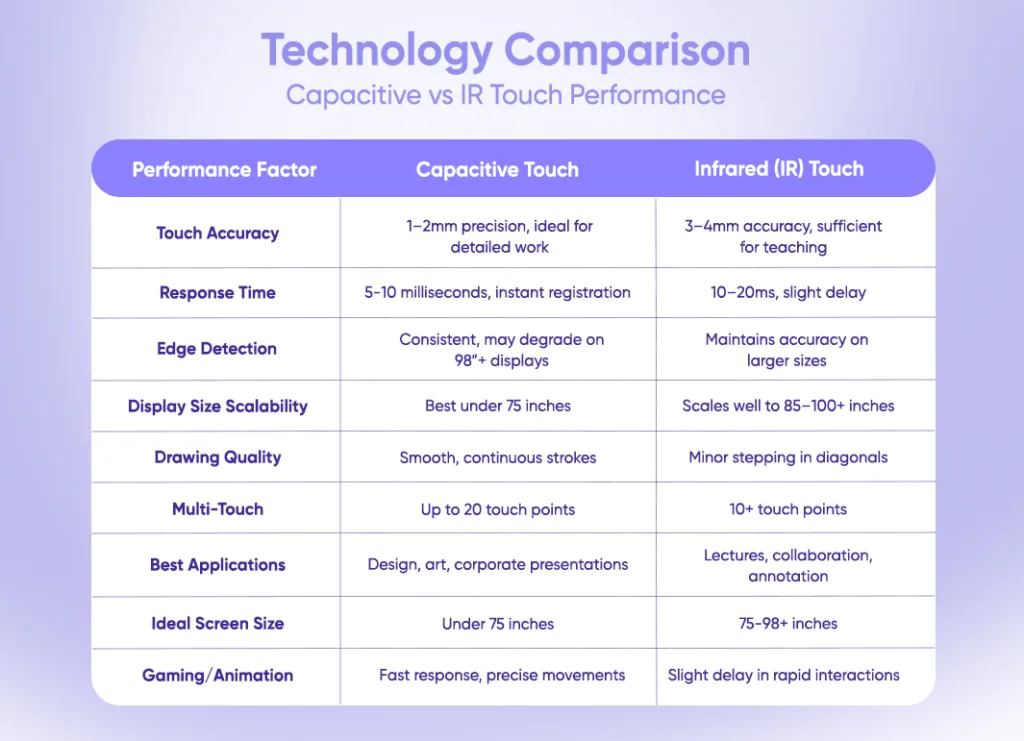
Capacitive technology excels at recognizing multiple simultaneous touches. Teachers can zoom, rotate, and manipulate content using standard hand gestures. The system tracks up to 20 touch points at once in advanced models.
This capability supports collaborative learning activities. Multiple students can interact with the board simultaneously. When selecting an interactive flat panel for schools, understanding touch technology becomes important for maximizing classroom engagement. Each touch registers independently without interference from other inputs.
Precision remains consistent across the entire display surface. Writing and drawing feel natural because the system detects subtle movements. Fine detail work becomes possible, which matters for subjects like geometry or technical drawing.
How Infrared Touch Technology Works in Smart Boards
IR panels create an invisible grid of light beams across the screen surface. Sensors line the display edges, sending and receiving infrared signals. When any object breaks these light beams, the system calculates the interruption point as a touch location.
Detection process follows clear steps:
- LED emitters send infrared beams horizontally and vertically
- Receivers on opposite edges monitor beam continuity
- Touch interrupts specific beam intersections
- Controller identifies X-Y coordinates from broken beams
This approach works without requiring electrical conductivity. A finger, pen, glove, or any solid object triggers detection. The technology doesn’t care about the object’s material properties, only that it blocks the infrared light.
Sensor Frame Configuration
IR panels use a visible frame around the display perimeter. This frame houses all emitters and receivers. The frame typically measures 8-12mm wide, creating a slight border around the active screen area.
Each sensor pair covers a specific detection zone. Standard configurations use 40-80 sensor pairs per side. Higher sensor counts improve touch accuracy but increase manufacturing costs. Most classroom panels balance 60 sensors per side for reliable performance.
The open-air design allows dust particles to settle on sensors. Regular cleaning prevents false touch detection. However, the external placement makes sensor maintenance straightforward compared to sealed capacitive systems.
Input Flexibility Benefits
Any opaque object works as an input tool. Teachers use regular whiteboard markers (capped), rulers, or pointing sticks during lessons. This flexibility matches natural teaching behaviors without requiring special equipment.
Winter teaching becomes easier because gloves don’t block functionality. Science labs benefit when students need protective gloves but still want to interact with displays. The technology adapts to real classroom conditions instead of forcing users to adapt.
Multi-touch works through simultaneous beam interruptions. The system can track 10+ touch points accurately. While not as refined as capacitive multi-touch, it handles typical classroom collaboration needs effectively.
Technology Comparison: Capacitive vs IR Touch Performance
Durability Analysis for Classroom Environments
Real classroom conditions test panel durability daily. Dust, physical contact, and continuous usage reveal which technology withstands educational environments better.
Environmental factors affecting panel lifespan include:
- Airborne dust from open windows and construction nearby
- Direct sunlight causing heat buildup on display surfaces
- Physical impacts from bags, elbows, and cleaning activities
- Temperature fluctuations in non-air-conditioned classrooms
- Moisture during monsoon seasons affecting electronic components
Capacitive Panel Durability Characteristics
The sealed glass construction protects internal components well. Dust cannot reach the conductive layer beneath the surface. Water resistance prevents moisture damage during cleaning or accidental spills.
Surface scratches affect capacitive performance more than IR panels. Deep scratches can damage the ITO coating, creating dead zones where touch stops working. Replacing the glass requires full panel service because all layers integrate together.
Heavy impacts risk glass cracking. Once cracked, the entire touch function fails across the display. Corporate environments with controlled conditions see better capacitive panel longevity beyond 5 years.
IR Panel Durability Characteristics
The open sensor design exposes components to environmental factors. Dust accumulation on sensors causes false touches or missed inputs. Weekly cleaning maintains optimal performance in dusty locations.
Physical durability exceeds capacitive alternatives. The display glass doesn’t contain electronic components. Scratches and minor cracks don’t affect touch functionality. Only severe damage that blocks infrared beams impacts performance.
Sensor resilience provides practical advantages:
- Individual sensor failures don’t disable the entire panel
- Damaged sensors can be replaced without screen replacement
- Most failures involve cleaning rather than component replacement
Schools in rural areas report better IR panel performance. The technology tolerates imperfect conditions without catastrophic failures. Maintenance teams handle basic troubleshooting without manufacturer support.
Cost Analysis: Investment and Maintenance Considerations
Budget planning requires understanding both initial purchase costs and ongoing maintenance expenses. Total cost of ownership varies significantly between technologies.
Initial Purchase Price Comparison
Capacitive panels cost ₹65,000 to ₹2,80,000 depending on size and features (Market Research, 2024-2025). A standard 75-inch PCAP smart board averages ₹1,80,000 for educational specifications. Premium models with advanced features reach ₹2,50,000+.
IR panels range from ₹45,000 to ₹2,00,000 for equivalent sizes. The same 75-inch display with IR touch costs approximately ₹1,20,000. This represents 30-35% savings compared to capacitive alternatives.
Large-scale deployments magnify cost differences. Equipping 20 classrooms costs ₹36,00,000 for capacitive versus ₹24,00,000 for IR panels. Budget-conscious institutions redirect savings toward other educational technology needs. Learn more about essential smart classroom equipment that complements your interactive panel investment.
Maintenance and Repair Costs
Capacitive panels need specialized service when problems occur. Touch calibration requires manufacturer technicians. Glass replacement costs ₹40,000-₹80,000 because the entire touch assembly must be replaced together.
IR panels allow local servicing in most cases. Sensor replacement costs ₹2,000-₹5,000 per unit. Most issues resolve through cleaning or basic troubleshooting. Schools maintain IR panels internally after basic training.
5-year maintenance cost projection:
- Capacitive: ₹45,000-₹65,000 (includes 1-2 major services)
- IR: ₹15,000-₹25,000 (routine cleaning and minor repairs)
Downtime costs matter beyond direct repair expenses. Capacitive repairs often require shipping panels to service centers. Classes lose access for 1-2 weeks. IR repairs complete within 1-2 days using locally available parts.
Input Method Compatibility and Teaching Flexibility
Different teaching styles require different input capabilities. Capacitive touch limits input to conductive objects like fingers or specialized styluses costing ₹1,500-₹8,000. Regular pens or pointers don’t register. IR touch accepts any solid object as input, matching traditional teaching habits without forcing behavior changes.
Winter and Laboratory Scenarios
Northern Indian schools face cold winters where teachers wear gloves indoors. Capacitive panels stop functioning with standard gloves. IR panels work identically with or without gloves, maintaining normal teaching flow. Laboratory environments requiring protective gloves benefit from IR’s flexibility, as science teachers can demonstrate without removing safety equipment.
Stylus Requirements
Capacitive styluses need battery power or capacitive tips to function. Active styluses with palm rejection cost ₹3,000-₹12,000. IR panels work with free, passive styluses. Any narrow object functions as a pointing tool without recurring replacement costs.
Best Use Cases: When to Choose Each Technology
Application requirements determine which technology delivers better value. Neither option works perfectly for every situation.
Capacitive Touch Ideal Scenarios
Corporate meeting rooms benefit from capacitive precision and aesthetics. The seamless glass surface looks professional. Presentation software with gesture controls works smoothly. Budget constraints matter less in business environments.
Design and art classrooms need capacitive accuracy. Drawing applications require precise stroke capture. Color-critical work displays better on the superior optical clarity that sealed glass provides.
Capacitive works best when:
- Detailed precision matters more than budget
- Controlled environments prevent dust accumulation
- Multiple simultaneous touches happen frequently
- Aesthetic appearance influences purchasing decisions
Small displays under 65 inches perform well with capacitive technology. Cost differences shrink at smaller sizes. Conference room applications typically use these size ranges.
IR Touch Ideal Scenarios
Standard K-12 classrooms match IR capabilities perfectly. Teachers need reliability over premium features. Budget efficiency allows schools to equip more classrooms with available funds. Input flexibility supports varied teaching methods. For a detailed comparison of available options, explore our guide on the best interactive panel in India to find the right fit for your institution.
Large displays above 75 inches work better with IR technology. Touch accuracy remains consistent across the entire surface. Cost advantages increase with panel size. Auditoriums and large lecture halls benefit from IR scalability.
IR excels when:
- Budget limits require cost-effective solutions
- Dusty or uncontrolled environments exist
- Teachers use varied input tools naturally
- Large screen sizes are needed
- Local maintenance capabilities are preferred
Rural and semi-urban schools choose IR for durability reasons. Environmental conditions challenge sealed electronics. Open sensor designs tolerate imperfect conditions better. Service accessibility matters when manufacturer support sits far away.

Why Should You Choose Senses Electronics for Interactive Panels?
Educational technology requires partners who understand real classroom challenges. Your current panel selection might not match actual teaching needs. Senses Electronics changes how Indian schools approach interactive display decisions.
Solutions That Work:
- AI-powered panels supporting both capacitive and IR options
- Complete software suite reducing technology complexity
- Pan-India support network for reliable service
Proven Education Performance
Technology Leadership: “70% market share in private sector interactive panels across India” Deployment Scale: “9,000+ institutions trust Senses Electronics for classroom technology” Installation Experience: “100,000+ panels installed with consistent performance”
Your school needs technology that fits Indian conditions. Senses Electronics manufactures panels in Pune specifically for local requirements. The system adapts to your teaching style through self-learning AI capabilities.
Key Technology Capabilities:
- NEP 2020 compliant interactive solutions
- Multi-format support for any teaching content
- Comprehensive training reducing setup complexity
Smart classrooms need reliable partners. Senses Electronics provides end-to-end support that reduces your IT team workload.
Ready to select the right touch technology? Book a Free Demo Call!

Conclusion
Touch technology selection impacts daily teaching quality for years. IR panels deliver better value for most Indian classroom scenarios through lower costs, higher durability, and input flexibility. Capacitive technology serves specific needs where precision and aesthetics justify premium pricing.
Business Impact Considerations:
- Large-scale deployments save 30-40% choosing IR over capacitive alternatives
- Maintenance costs drop significantly with IR panels in typical school environments
- Teaching flexibility improves when technology adapts to natural instructor behaviors
- Total cost of ownership over 5 years favors IR in educational settings
Your institution’s specific requirements determine the right choice. Budget-conscious schools benefit from IR technology. Premium institutions prioritizing precision and aesthetics choose capacitive panels. Both technologies serve educational needs effectively when matched to appropriate use cases.
FAQs
IR touch works better for large smart boards above 75 inches. It maintains consistent accuracy across bigger surfaces. Manufacturing costs stay lower compared to large capacitive panels.
Capacitive touch screens do not work with regular gloves. They need special conductive gloves that cost extra. IR touch works with any gloves without additional purchases.
Schools prefer IR touch for cost savings and durability. IR panels cost 30% less than capacitive options. They handle dusty classroom environments better than sealed capacitive screens.
IR panels cost less to maintain and repair. Individual sensors can be replaced locally for ₹2,000-₹5,000. Capacitive repairs need full assembly replacement costing ₹40,000-₹80,000 through authorized service centers.